Manage Outside Domain
How to manage DNS for a domain that is not registered at Domain Support
Domains must be pointed to Domain Support's nameservers for these DNS settings to work. Please contact your registrar for more information on how to update your nameservers to point to Domain Support. Find your domain registrar using our WhoIs Lookup by clicking here.
1. Login to your account by clicking here.
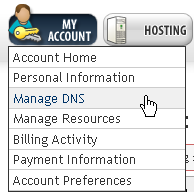
2. Select the My Account option from the navigation bar then choose the option for Manage DNS from the drop down menu.
3. Enter the domain name in the “Manage Domain Not on List” box then click “Add”.

4. Add the appropriate records.