Expiration Date
There are two ways to locate your domain expiration date.
WhoIs Lookup
The WhoIs Lookup is a searchable database which provides information about a registered domain name.
To lookup your domain details in the WhoIs Database, click here.
Domain Control Panel
To view the expiration date in your control panel, follow these instructions:
1. Login to your account by visiting our Login Page
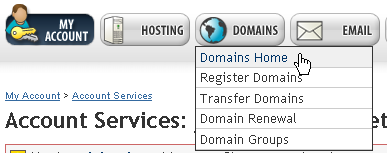
2. Select the Domains option from the navigation bar then choose the option for Domains Home from the drop down menu.
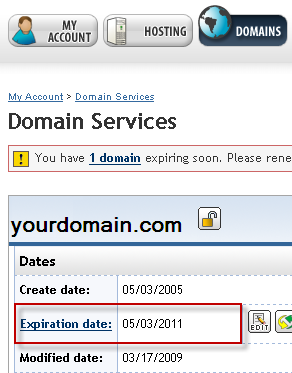
3. The Domain Services page provides you with important information about your domain name, including the Expiration Date. Look in the top left corner of the page to view the Expiration Date of your domain name.
4. To view more expiration dates of your domain names, scroll down on the Domain Services page to view the All Domains list.
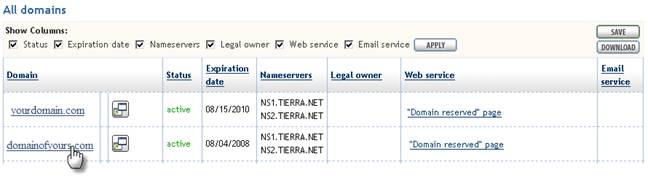
To display a different domain name at the top of the page, click on the domain link.
5. If you have a domain name ready to expire, we place a notification on the My Account page.
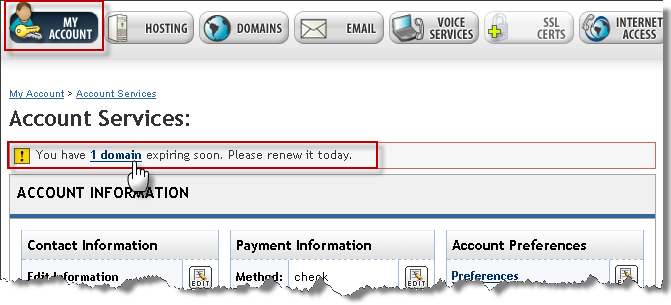
Click the domain link to proceed and see which domain(s) are expiring soon and their expiration dates.