How to renew my domain
To successfully renew your domain name, please follow the instructions below:
1. Login to your account by visiting our Login Page
2. If you have a domain name ready to expire, we place a notification on the My Account page.
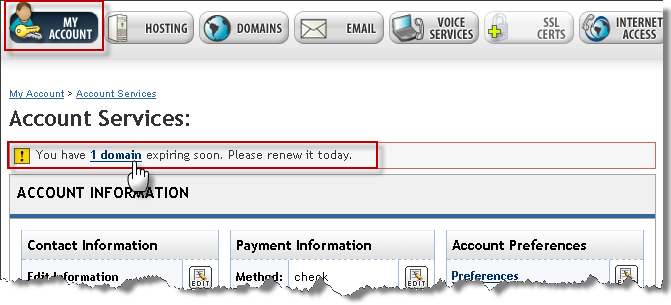
Click the domain link to proceed and see which domain(s) are expiring soon and their expiration dates.
3. Or, select the Domains option then Domain Renewal from the navigation bar.
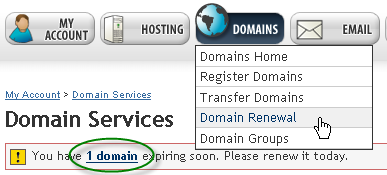
4. On the Domain Renewal page, check the box (es) to the left of the domain name(s) you wish to renew.
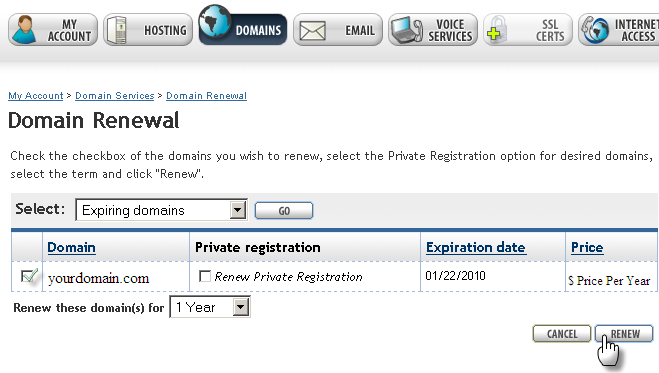
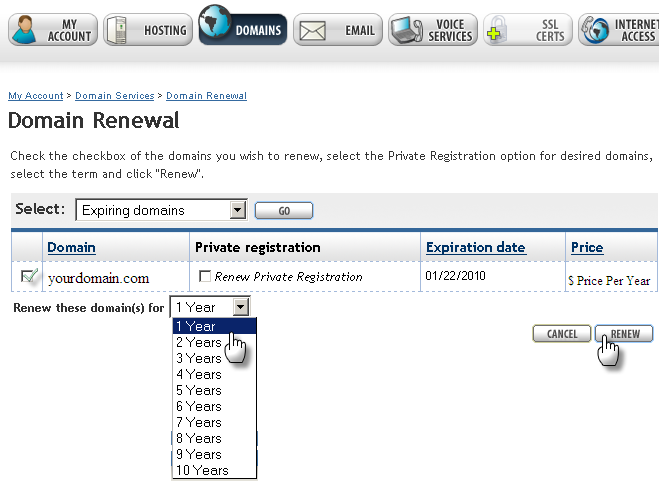
5. Select the amount of years to renew by clicking the drop down menu. Domain renewals can be from 1 to 10 years, with 10 years the maximum amount of time a domain name can be renewed.
6. To add Private Domain Registration, check the box under Private Registration. To learn more about private registration, click here.
7. When you’re ready, click the Renew button to proceed to payment.
You can also contact our customer support to process your domain renewal over the phone.